


PANASONIC ENHANCES BROADCAST WORKFLOWS FROM CAMERA TO CONTROL ROOM
Improved colour matching functionality; new KAIROS control options; and standard-setting PTZ cameras reflect Panasonic’s continuous broadcast innovation.
Wiesbaden, DE. 3rd September 2026 – Panasonic Connect Europe’s latest broadcast and ProAV innovations enable content creators and production teams to deliver smarter, more efficient and visually compelling live productions through advances in imaging, automation and workflow technology.

Industry-First Innovation with Global Shutter MOS Sensor
Panasonic’s new AW-UE200/AW-UER200 series of remote, high performance 4K PTZ cameras are the industry’s first[1] PTZ cameras to include a global shutter MOS sensor. They feature ultra-high speed pan/tilt capabilities that capture fast-moving objects; and 22x optical zoom that delivers crisp visuals in large venues.
Both series eliminate distortion when capturing fast-moving objects, without compromising their true shape. They offer compatibility with LED walls and minimise flicker from stage lighting. The UER200 series features a cutting-edge roll mechanism with a roll axis range of -200° to +200° and supports vertical (9:16) and horizontal (16:9) video output using full sensor. This makes it ideal for direct streaming onto social media platforms.
[1] Based on Panasonic research as of September 2026 for MOS sensors in PTZ cameras.

Enhanced KAIROS Control Panels
Panasonic has launched two new control panels for its KAIROS IT/IP live video production platform. These are available with 12 Buses/40 Crosspoint Buttons; and 12 Buses/30 Crosspoint Buttons, ideal for managing complex, large-scale live productions.[1] The large touch panels on each Bus row provide simple access to snapshots, macros, and other frequently used functions. This reduces operator fatigue and enables smoother switching. The AT-KP340 will be available in Q2 CY2027, with the AT-KP330 available in Q3 CY2027.[2]
[1] Some features are still under development, so specifications and release dates are subject to change.
[2] For the latest information on product availability, please refer to the product website.
New Auto Colour-Matching for Image Adjust Pro Software
Panasonic’s Image Adjust Pro Media Production Suite plug-in has been updated with enhanced virtual remote-control panels, and a new automatic colour-matching function. This automatically aligns the colours from multiple cameras to a reference camera without requiring specialist knowledge.[1] This reduces manual efforts to adjust gamma, matrix and colour correction settings, streamlining on-location colour matching.
This simplifies pre-production setup and reduces operator workload, while the intuitive GUI interface enables consistent colour matching across Panasonic and third-party cameras.[2] The result is a smarter, more efficient workflow for live production environments. The update is scheduled to be released in Q4 CY2026.[3][4] It is also planned to support the new AW-UE200 and AW-UER200 PTZ cameras in the future.
[1] Some features are still under development, so specifications, screens, supported models and release dates are subject to change.
[2] Only Panasonic cameras support colour adjustment using a reference camera, but the reference camera can be a third-party model.
[3] For the latest information on firmware availability, please refer to the product website.
[4] Automatic colour matching is available on models compatible with Image Adjust Pro (AW-SF600).

Enhanced Colour Adjustment for 4K Cameras
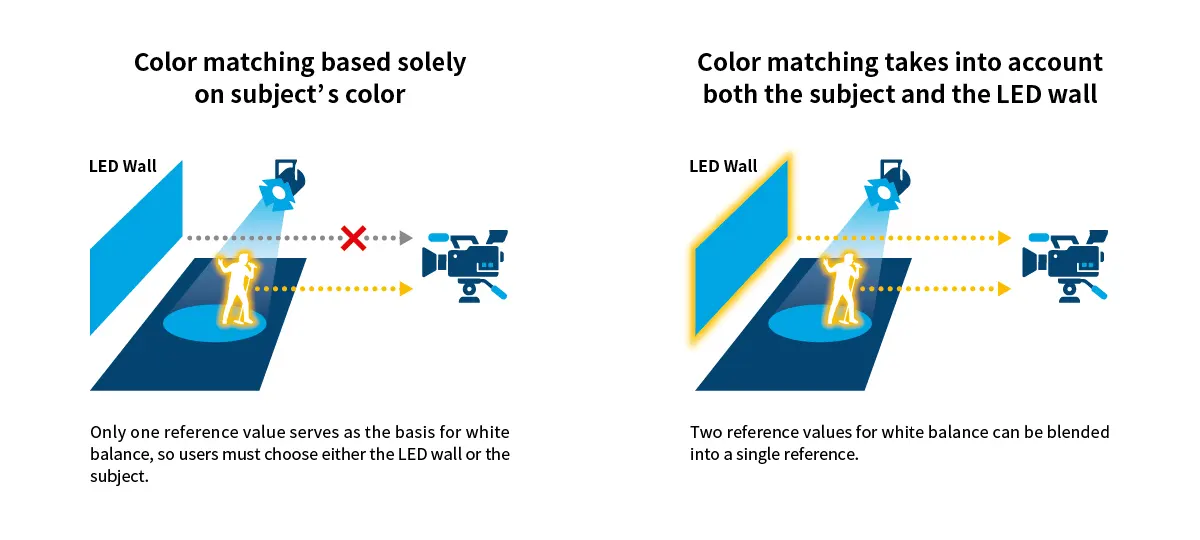
Panasonic has introduced new colour adjustment functions[1] for its AK-UCX100 studio camera, and AK-UBX100 multi-purpose camera, available in Q4 CY2026. These deliver the desired colour expression for creators, and simplify colour matching between cameras for live events with LED walls, broadcast studios, and virtual productions.
The Color Temp. Blend function takes the colour temperature data from LED walls and stage lighting, blending them to generate an optimal white balance for the desired shooting environment. This closely aligns visuals from real-world subjects and LED wall footage.
Target Color Correction allows users to designate a specific colour and adjust its hue and saturation individually. For example, it enables pinpoint correction of corporate brand colours or sponsor logos displayed on an LED wall. The function can configure up to three colour tables simultaneously.
Panasonic’s Chroma Suppression function allows users to maintain overall colour reproduction whilst suppressing colour shift and saturation in highly saturated visuals. This is useful for operators shooting LED displays that feature vivid computer-generated imagery at live events such as concerts, whilst achieving high-quality video expression.
[1] Will be launched via firmware update.
Read more insights…
article
PANASONIC PIONEERS GLOBAL SHUTTER TECHNOLOGY WITH AW-UE200 & AW-UER200 PTZ SERIES
New cameras are first to feature global shutter MOS sensors, enabling high-speed 4K image capture for sports broadcasting, studio production and live events.
blog
What to Look for When Choosing a Remote PTZ Camera
Remote PTZ (Pan, Tilt and Zoom) cameras have transformed the way organisations create and deliver video content.
article
UNIVERSAL PIXELS SELECTS PANASONIC AUTO FRAMING SOFTWARE FOR OASIS REUNION TOUR
Advanced AI-driven software chosen by Universal Pixels to enhance adaptability of Panasonic PTZ cameras, reducing operator workloads whilst delivering excellent visual quality.
Case Study
Universal Pixels Enhance Oasis Reunion Tour with Panasonic Auto Framing Software
Panasonic’s advanced Auto Framing Software enhances the adaptability of its PTZ cameras during Oasis’ reunion tour, while the exceptional colour fidelity of 4K studio cameras elevates the visual experience for global tours.
Sorry there was an error...
The files you selected could not be downloaded as they do not exist.
You selected items.
Continue to select additional items or download selected items together as a zip file.
You selected 1 item.
Continue to select additional items or download the selected item directly.








Share page
Share this link via:
X
LinkedIn
Xing
Facebook
Or copy link: