


3-Chip DLP™ Projector PT-RQ45K Series
PT-RQ45K
AVAILABLE FROM CY2026 Q3.A New Benchmark in 4K Projection: Introducing the World’s Smallest and Lightest 42,000 lm Projector
Key features of PT-RQ45K
Key features
| Compact 42,000 Lumen Design for Efficient Workflow |
| Lasting Reliability in Harsh Environments |
| Spectacular 4K Visuals |




| PT-RQ45K Series | ||
|---|---|---|
| Model | PT-RQ45K | PT-RZ44K |
| Brightness | 42,000 lm1 / 42,000 lm (ANSI)7 | |
| Resolution | 4K (3840 x 2400 px)4 | WUXGA (1920 x 1200 px) |
Note: Availability of the PT-RZ44K may vary by country or region.
1 With the ET-D3LES250 Zoom Lens attached. When [PICTURE MODE] is set to [DYNAMIC] and [LIGHT POWER] is set to [NORMAL]. Measurement, measuring conditions, and notation method all comply with ISO/IEC 21118: 2020 international standards. Value is the average of all products when shipped.
2 Measurement, measuring conditions, and method of notation all comply with American National Standards Institute standards. Value is the average of all products when shipped.
3 Average light-output value of all shipped products measured at the center of the screen in NORMAL Mode.
4 PT-RQ45K only. Maximum physical resolution 3840 x 2400 pixels with QUAD PIXEL DRIVE: [ON].
5 PT-RQ45K only. Supports input signals up to 1080p. The display frame rate corresponds to the input signal frame rate.
6 Requires optional TY-SB01DL DIGITAL LINK Terminal Board.
7 Input signals to the PT-RZ44K are converted to the projector’s display resolution upon playback. YPBPR 4:2:0 format only for 4K/60p signals input via DIGITAL LINK.
8 PT-RZ44K only.
9 PT-RQ45K only. 12G-SDI input for the PT-RZ44K is available with the optional TY-SB01QS 12G-SDI Terminal Board.
10 Optional proprietary and third-party function boards are sold separately. The operation of third-party devices cannot be guaranteed.
11 Coating applied to selected circuit boards only.
12 Conforms to the IP5X Dust Protected (IEC 60529) standard. The Dust Protected performance of this unit is not guaranteed to be free from damage or failure under all conditions (environment with conductive dust, etc.). Please use an enclosure in environments with smoke containing oil, salt, and moisture.
13 The combination of primary and backup terminal assignments is fixed and input signals must be identical. Backup Input mode for SDI requires an optional TY-SB01QS 12G-SDI Terminal Board. Backup for 12G-SDI signals is available with the PT-RQ45K only.
Playlist
2 videos
A Revolution in Workflow Efficiency

Innovations to Ease Every Step
As a technology partner with decades of hands-on experience, Panasonic works closely with rental companies, integrators, and creators across every phase of a project, translating insight into practical design. The result is a suite of features that streamline workflows from preparation and transport to setup, operation, and maintenance, reducing labor, cost, and complexity while maximizing performance and return on investment.

The World’s Smallest and Lightest 4K Projector in Class
With almost identical body dimensions the PT-RQ35K2/K Series—long a benchmark for high-brightness projection mapping—the PT-RQ45K Series delivers higher output without increasing size. Rental companies and owner-operators benefit from reduced transport, storage, and installation demands, lowering deployment cost and environmental impact. Compatibility with existing frames, flight cases, and lenses for the PT-RQ35K2/K Series further streamlines fleet upgrades, reducing TCO for a stronger return on investment.
Note: According to internal research based on published dimensions and weights of projectors with 36,000 lm or higher as of May 2026. Max. physical resolution 3840 x 2400 pixels with QUAD PIXEL DRIVE: [ON] (PT-RQ45K only). PT-RQ45K Series supports current-generation D3LE lenses and the ET-D75LE95. Some legacy lenses used with the PT-RQ35K2/K Series are not supported. All lenses and accessories sold separately.

5-inch Color Information Monitor LCD
All the information you need is now at your fingertips. A 5-inch color LCD built into the control panel displays projector settings UI, projection angle, video previews prior to projection, and real-time status, including
error codes. Operated via the control panel keys, it offers faster setup, swift troubleshooting and recovery, and confident control for an interruption-free show.

12G-SDI Input and Intel® SDM Standard-Compatible Slot
The PT-RQ45K is the first Panasonic projector to equip a 12G-SDI input as standard, enabling stable transmission of high-bandwidth, high-resolution video content over long distances. An Intel® SDM standard-compatible slot integrates optional third-party or proprietary function boards such as our ET-SBFMP10 Media Processor, which simplifies complex multi-projector systems and reduces setup time for projection mapping and other large-scale installations.
Note: 12G-SDI input for the PT-RZ44K is available with the optional TY-SB01QS 12G-SDI Terminal Board. Optional proprietary and third-party function boards are sold separately. The operation of third-party devices cannot be guaranteed.
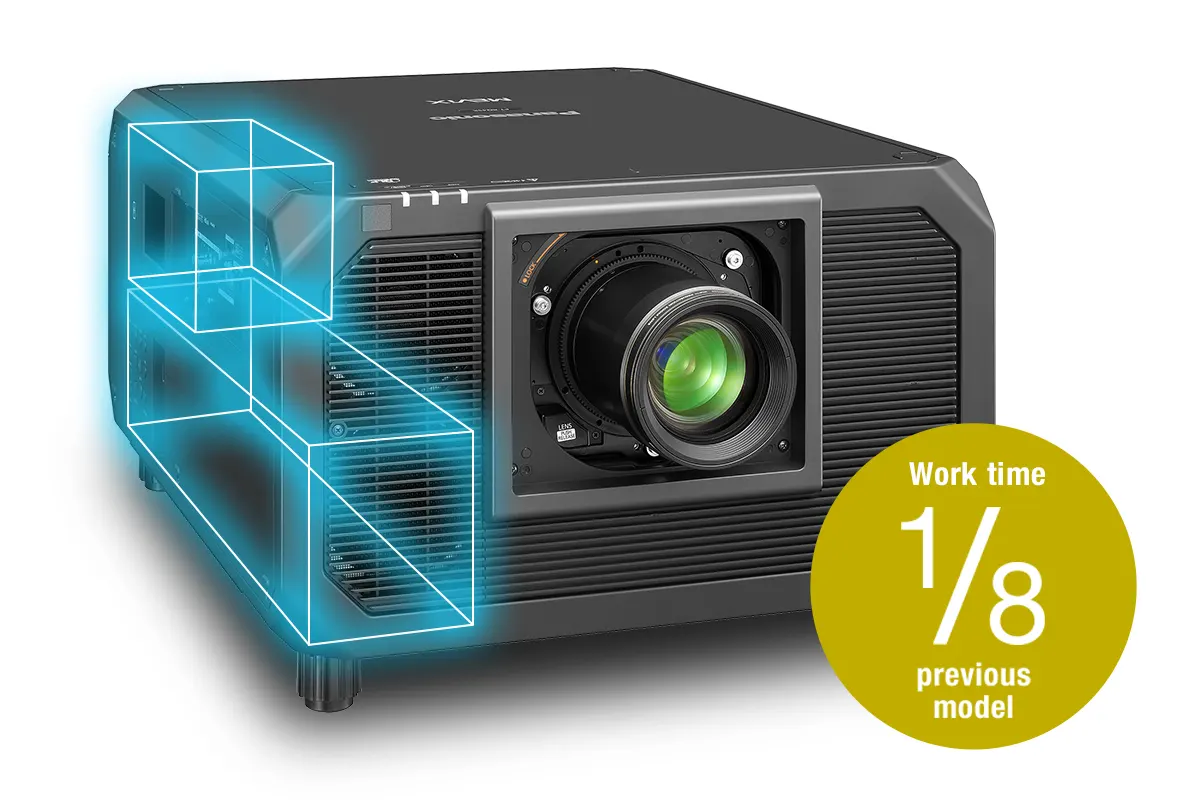
Modular Design for Faster Servicing
A redesigned internal structure improves access to key components, simplifying maintenance for rental applications where projectors are cleaned and serviced between deployments. Core modules can be accessed and handled more efficiently—even with the frame
attached—greatly reducing complexity and servicing times compared
to previous designs. The result is faster turnaround, less downtime,
and improved operational efficiency.
Note: One-eighth work-time based on power supply replacement under typical conditions compared to previous models.

Contrast Sync and Shutter Sync via LAN
Enhanced multi-projector contrast and shutter sync is now supported over LAN only or, if preferred, conventional daisy-chain BNC connections. Reduce cabling requirements, lower system costs, and simplify installation without compromising on performance.
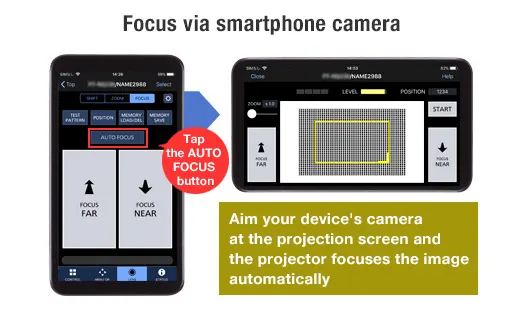
Smart Projector Control App Integration
Smart Projector Control app enables the control and adjustment of up to 64 projectors from a smartphone or tablet over wireless LAN. Access the projector menu via the Web Control UI and manage key functions including test pattern selection, lens setup, shift, zoom, and focus via the device camera, as well as shutter operation, brightness locking, and status monitoring. For details, visit the Smart Projector Control webpage.
Note: Available free from the App Store or the Google Play store. Some mobiles do not support the focusing function via the device camera.
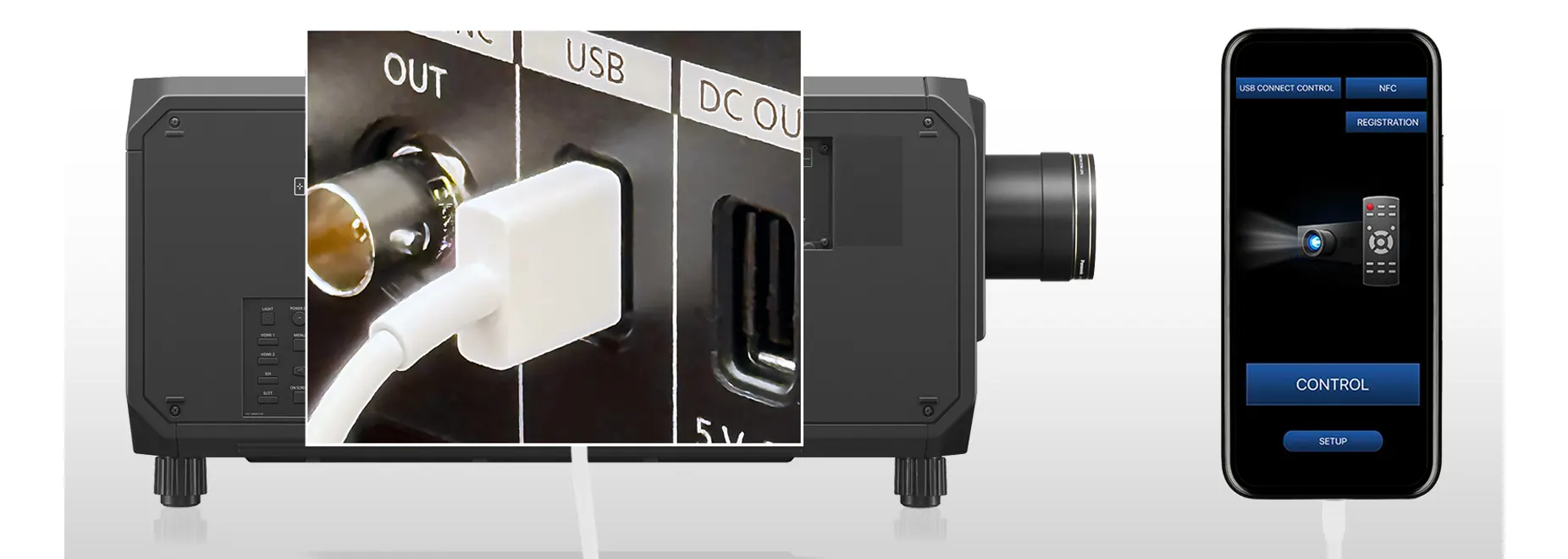
USB Control Connect: App Control Without Wireless LAN
Avoid delays during projector setup when network infrastructure is not yet available on site. USB Control Connect enables use of the Smart Projector Control app via a USB connection, allowing installers to perform screen adjustments and configure settings directly from their mobile device. Improve setup efficiency and keep your project on schedule.
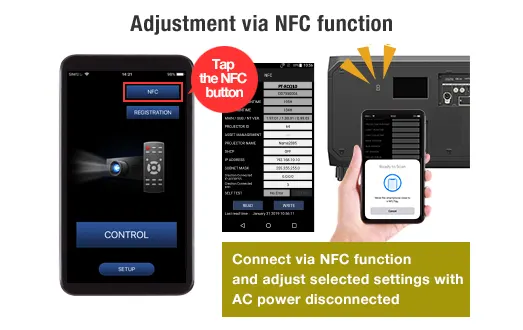
NFC Function: Prep Without AC Power
Prepare your projectors before power is available on site and reset them after use without on-screen menu projection. Using the Smart Projector Control app and NFC, installers can assign projector IDs, set IP addresses, and prepare units for network connection while unplugged. After the event, settings can be initialized to factory defaults prior to crating, streamlining teardown and ensuring projectors are ready for the next deployment.
Note: Projectors sold in some countries or regions require an ET-NUK10 Upgrade Kit from PASS to activate the NFC function. See the NFC Regional Compatibility List for details.

Pre-Show Video Checks with Remote Preview
Remote Preview allows projectionists to verify input signals via video thumbnails before projection. Accessible via remote PC via Multi Monitoring & Control Software or web browser, or via the Information Monitor, it works in Standby or with the shutter engaged, helping identify issues in advance and reduce on-site errors when screen access is limited.

Compatible with Visual Software Suite (VSS)
Visual Software Suite is a free, Windows®-based platform that combines multiple functions into one intuitive graphical interface, enabling swift and efficient setup and onsite adjustments. Integrating and enhancing the capabilities of previously separate Panasonic software, it transforms your workflow into streamlined and cost-effective processes. For more information, please visit the VSS webpage.
Note: Some described functions require use with an optional ET-FMP50 Series media processor and camera (both sold separately). Compatible cameras comprise NIKON D5200/D5300/D5500/D5600/D7500/Z50/Z5 and the IDS GV-5890CP-C-HQ. Note that the PT-RQ45K Series is incompatible with Geometry Manager Pro software. Please visit PASS for more information.
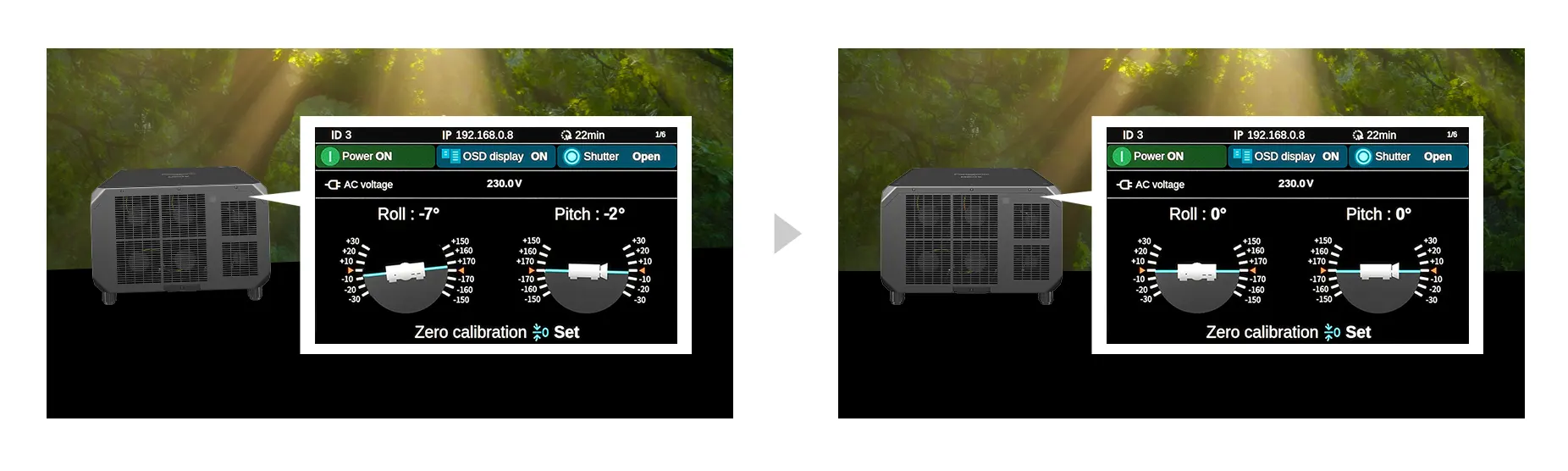
Angle Monitor for Convenient, Resource-Friendly Adjustment
The PT-RQ45K Series features a built-in sensor that detects changes in the projector’s pitch and roll angles, which are graphically displayed via OSD menu projection or the Information Monitor. A single technician can view the on-screen information and adjust the projection angle without needing assistance from another team member.
Note: The displayed values are based on the results of angle sensor detection and may differ from the actual projection angle. They are for reference only, and accuracy is not guaranteed.

A Range of Lenses to Suit Your Application
The PT-RQ45K Series is compatible with the current-generation D3LE-series lenses used with most Panasonic 3-Chip DLP™ projectors, helping rental companies and owner-operators maximize asset utilization and reduce the total cost of ownership. A broad lineup of fixed-focus and zoom lenses supports throw distances from 4.64 m to 180 m (15.2 ft to 590 ft). High-quality optics with Lens ID, Lens Memory, and Active Focus Optimizer (AFO) functions ensure precise setup and optimal image performance.
Note: The ET-D75LE95 ultra-short-throw lens is also supported. Lens ID, Lens Memory, and AFO are not available with some lenses. Throw distances specified for a 600-inch (16:10) image. Visit our Lens Guide webpage for more information.
Note: Throw distances in graphic specified for a 300-inch (16:10) image.

Lasting Reliability in Harsh Environments

Coated Circuit Boards for Enhanced Durability
Selected circuit boards are treated with a proprietary coating that helps suppress corrosion caused by moisture and dust. This added layer of protection improves reliability in harsh environments, including locations exposed to marine air such as coastal venues and cruise ships. By reducing the impact of environmental factors on key components, the design supports stable, long-term operation in demanding conditions.
Note: Outdoor installation is not possible. Use of an enclosure is recommended in environments containing smoke, salt, oil, conductive dust, moisture, and
other airborne contaminants.
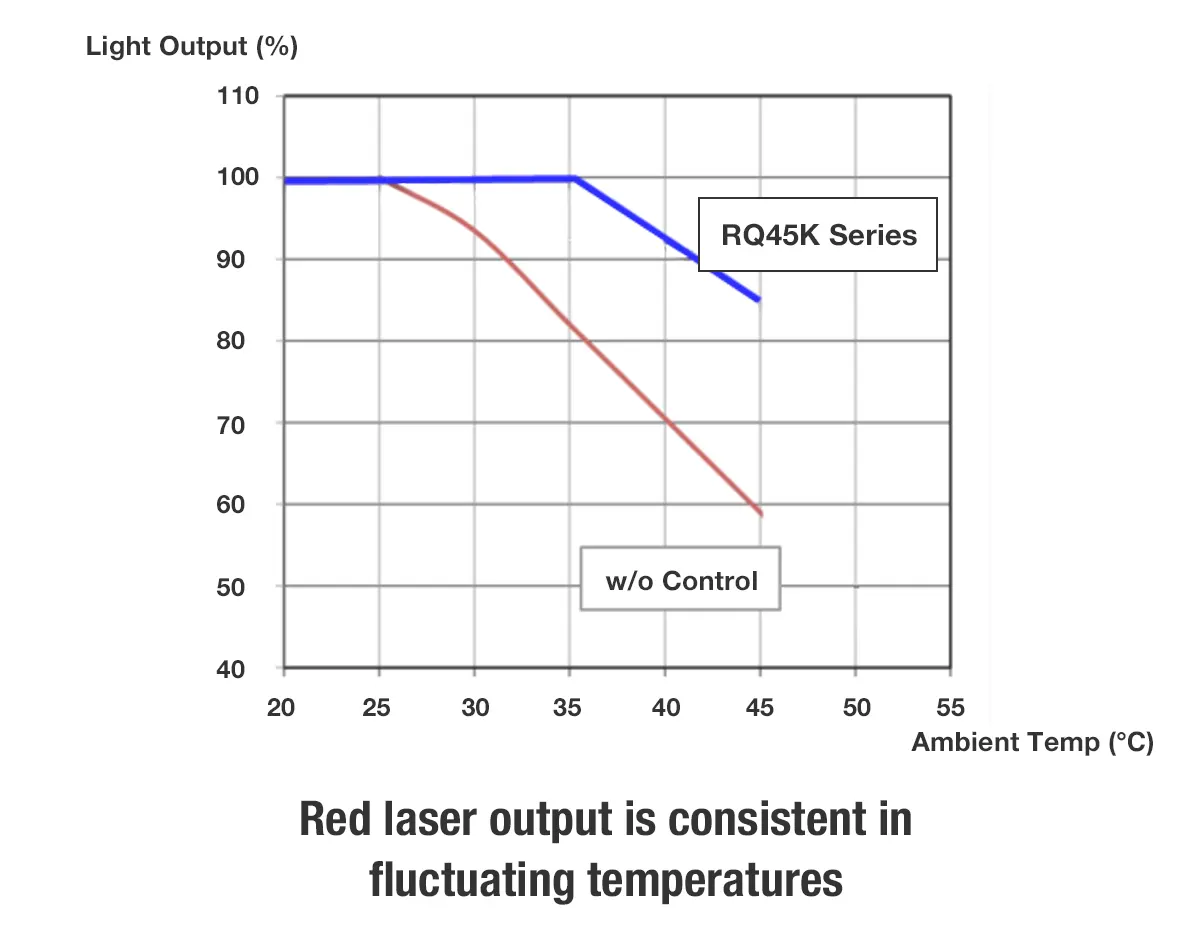
Dynamic Digital Control Ensures Stable, Consistent Color
Red laser light enhances color expression but is inherently sensitive to temperature variation. Dynamic Digital Control solves this challenge by precisely modulating light output frame-by-frame to maintain optimal RGB balance under changing conditions. Combined with a dedicated liquid-cooling system that stabilizes red laser performance, it enables consistent brightness and color accuracy—unlocking richer reds, deeper blues, and more faithful image reproduction.
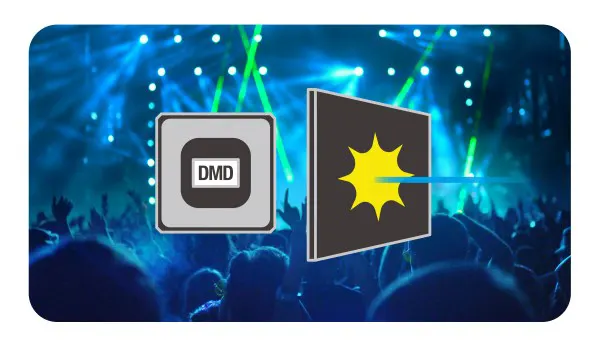
Built-In Mechanical Shutter
The PT-RQ45K Series features an internal mechanical shutter. Designed for live event environments where laser lighting is often used, the shutter helps protect the DMD chips by blocking stray laser beams that may enter through the projection lens, reinforcing reliability in demanding production settings.

Low-Maintenance, Dust-Resistant Design
The PT-RQ45K Series’ optical engine and laser light source conform to the IP5X Dust Protected (IEC 60529) standard, eliminating the need for an air filter and reducing maintenance requirements. Independent sealed liquid-cooling systems for red and blue lasers, a refined airflow path, and a finless radiator help stabilize performance. Reliability is proven through accelerated dust testing based on in-house standards, simulating environments with high levels of airborne particulates.
Note: The Dust Protected performance of this unit is not guaranteed to be free from damage or failure under all conditions (environments with conductive dust, etc.). Please use an enclosure in environments with smoke containing oil, salt, and moisture.
Backup Input for Reliable Signal Redundancy
Backup Input mode safeguards projection by enabling automatic failover between two identical signals. When the source outputs the same content to designated primary and backup inputs—either HDMI™ or SDI—the projector instantly switches to the backup if the main signal is lost, with no screen blanking. This reduces the chance of image display interruption and provides greater peace of mind in mission-critical environments.
Note: The combination of primary and backup terminal assignments is fixed and input signals must be identical. Backup Input mode for SDI requires an optional TY-SB01QS 12G-SDI Terminal Board. Backup for 12G-SDI signals is available with the PT-RQ45K only.
Failover Circuitry Minimizes Interruptions
Multiple laser modules incorporate unique Failover Circuitry. If a single diode fails, only the affected series is bypassed rather than the entire module, as with some conventional designs. Projection continues uninterrupted with minimal loss of brightness, providing an added layer of reliability where continuous image display is critical.
Spectacular Visuals for the Biggest Events
Smooth 4K Images with Quad Pixel Drive
Proprietary Quad Pixel Drive technology enhances perceived 4K resolution by applying high-speed pixel shifting in both vertical and horizontal directions. Combined with 240 Hz signal processing, the system divides each frame into sub-frames and precisely aligns them on screen, increasing pixel density and reducing visible structure. The result is smooth, detailed 4K images, even at close viewing distances.
Note: Max. physical resolution 3840 x 2400 pixels with QUAD PIXEL DRIVE: [ON] (PT-RQ45K only).

Red and Blue Lasers for Vivid, Accurate Color
A combination of one red and two blue laser modules expands color-gamut reproduction to 91% DCI coverage, saturating the screen in vivid color and drawing the audience deeper into the experience. Optimized blue-laser wavelengths achieve truer blue while the red laser intensifies red expression for a greater sense of realism.

Gradation Smoother 2 – Precise and Powerful Control
Gradation Smoother 2 reduces visible banding in color gradients caused by limited bit depth in source content. The updated system expands adjustment from three to six correction levels, enabling finer control and more effective suppression of noise in challenging material. Users can select the appropriate level via the remote or disable the function when not required, minimizing the need for content re-editing.
Note: Projectors ship with Gradation Smoother 2 set to a factory default of [2].

Improved 25,000:1 Dynamic Contrast Performance
Panasonic’s Dynamic Contrast technology has been enhanced to achieve a 25,000:1 contrast ratio. Advanced scene analysis enables more precise recognition of light and dark areas, improving overall contrast expression. The system analyzes content frame by frame and dynamically adjusts light output to match the requirements of each scene.
Note: Contrast ratio measured Full On/Full Off with Dynamic Contrast [3]. Measurement, measuring conditions, and method of notation all comply with ISO/IEC 21118: 2020 international standards. Value is the average of all products when shipped.

Supports High-Speed 240 Hz Video
The PT-RQ45K supports 1080p/240 Hz video playback with input-to-output latency as low as 8 ms for smooth reproduction of fast motion with minimal blur. High-speed content can be displayed across multiple screens with edge blending, ideal for eSports and other applications where fluid, low-latency motion reproduction is important. This capability also supports the optional ET-SWR10 Real-Time Tracking Projection Mapping System, which uses infrared camera integration to project images onto moving objects at 240 Hz, seamlessly combining analog motion with digital effects in live performances and XR experiences.
Note: Image for illustration only. The display frame rate corresponds to the input signal frame rate. Latency varies depending on the input signal, peripheral devices, and other factors. Optional ET-SWR10 is used in conjunction with third-party devices (all sold separately). Compatibility with third-party devices cannot be guaranteed. Other conditions apply.
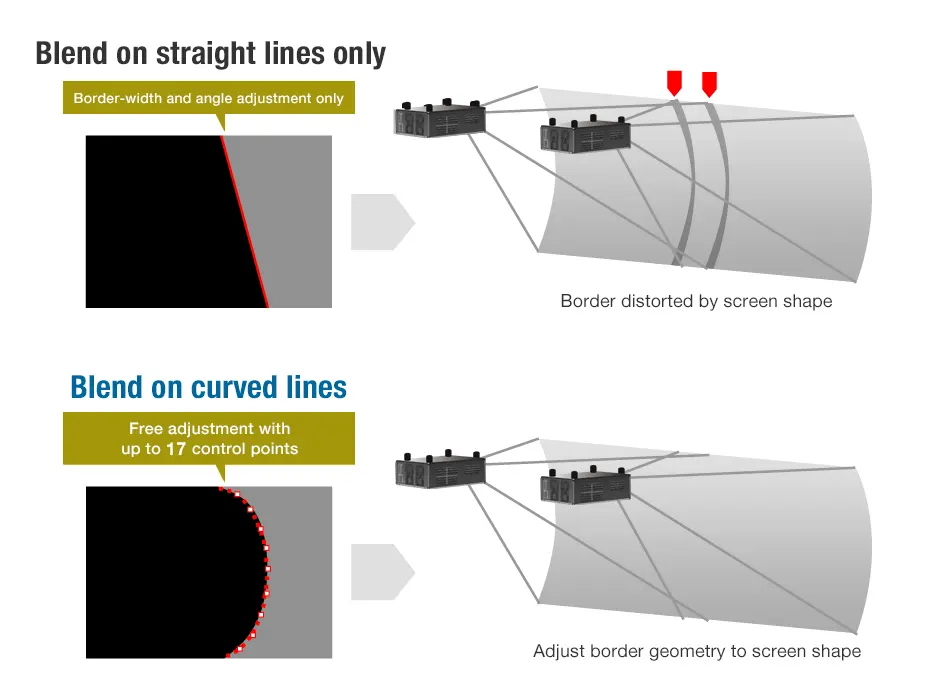
Precise Black-Level Adjustment for Curved Screens
Panasonic solves the challenge of black-level uniformity in blended areas on curved screens with more flexible adjustment catering to arbitrary screen shapes. Up to 17 control points can be used to reshape black borders for symmetrical fitting without distortion. Black levels can be precisely set within a half-pixel margin for seamless blends, even at close viewing range.

Uniform Black Levels Across the Entire Blend
Evolved black-level adjustment also eliminates black-level bumps appearing in blends outside of the image display area after applying geometric adjustment. By unlinking the black level and geometric adjustment, black-level settings can be applied to the entire blend, including the image overlaps outside the image display area, for a seamless multi-screen image.

Eco-Conscious Design
In addition to using about 71%1 recycled resin for the plastic parts in the main projector body, the PT-RQ45K Series is more efficient despite its higher brightness, delivering an impressive 13.2 lm/W—about 10% more efficient than the previous series2. The projector also includes an ECO Standby mode3 to reduce energy waste when idle.
1 By total weight of plastic parts in the projector main unit. Excludes projection lenses, printed circuit boards, labels, cables, connectors, electronic components, optical components, ESD components, EMI component adhesives, and coatings.
2 Luminous efficiency is calculated using max. brightness and rated consumption
(PT-RQ45K: 3,170 W; PT-RQ35K2: 2,550 W) on AC 200–240 V. Measurements comply with ISO/IEC 21118: 2020 international standards.
3 Power consumption is less than 1 W in ECO Standby and functional limitations apply.
Additional Features
- Supports Crestron Connected™ V2, Crestron XiO Cloud™, Art-Net DMX, AMX® DD, PJLink™, and IPv61
- Data-cloning function via LAN or USB2
- 1 USB port for DC 5 V/2 A power supply, 1 USB port for optional AJ-WM50 Series Wireless Module, USB Control Connect function, and data transfer from USB memory devices
- Compatible with the Multiple PJ Firmware Batch Update Tool
- Import and save user test patterns or client content images
for easy calibration - Updated Web UI interface and screen marker tools
- Multi-screen Support System
- Multi-Unit Brightness and Color Control
- DICOM Simulation Mode
- Waveform Monitor Function
1 Optional AJ-WM50 Series Wireless Module is not compatible with IPv6.
2 Data-cloning is supported among models in the same series with the same resolution. Excludes passwords, projector ID, and network settings.
Specifications of PT-RQ45K
Specifications table
| Projector type | 3-Chip DLP™ projector |
|---|---|
| Display method | DLP™ chip x 3, DLP™ projection system |
| Display Device -> Panel size | 24.4 mm (0.96 in) diagonal (16:10 aspect ratio) |
| Display Device -> Number of pixels | 2,304,000 (1920 x 1200 pixels) x 3 |
| Light source | Laser diodes (Blue LD, Red LD) |
| Light output *1 *2 *3 | 42,000 lm*3 |
| Light output (ANSI) *4 | 42,000 lm*4 |
| Light output (Center) *5 | 43,600 lm*5 |
Accessories & Software
Showing 4 of 12
ET-SBFMP10
Showing 3 of 3
ET-SBFMP10
Showing 3 of 3
Showing 1 of 1
Related resources
Sorry there was an error...
The files you selected could not be downloaded as they do not exist.
You selected items.
Continue to select additional items or download selected items together as a zip file.
You selected 1 item.
Continue to select additional items or download the selected item directly.








Share page
Share this link via:
X
LinkedIn
Xing
Facebook
Or copy link: