


50,000 lumen 4K+ Solid Shine Laser Projector
PT-RQ50K
World’s most compact 50,000 lumen Laser Projector with Native 4K Resolution
Key features of PT-RQ50K
Viktiga funktioner
| Laser 3-chip DLP, 50,000 lumens, Native 4K |
| Lamp-free laser projection with hermetically sealed optics and filter-less design, for 20,000 hours maintenance free operation |
| Compact body allows for simplified transport, install and adjustment |
| Dualised design provides the ultimate in backup and reliability |
| 20,000:1 contrast ratio |


The world’s smallest 50k lm native 4K projector
The PT-RQ50K is an all-in-one projector built to create breathtaking experiences with ease and reassurance. It combines Panasonic’s finest image quality and long-proven reliability.
| Brightness | 50,000 lm*1 / 50,000 lm (ANSI)*2 / 51,000 lm (Center)*3 |
| Resolution | Native 4K |
50,000 lm Native 4K Color-Rich Images for a Breathtaking Viewing Experience
Unleashes 50,000 lm*1 at Native 4K for emotionally immersive projection with newly developed laser engine expanding color-gamut by 114%*4 using an additional red laser for breathtaking image performance
Versatile All-in-One Design Streamlines On-Site Workflow
Convenient all-in-one body packs 50,000 lm*1 into PT-RQ32K’s compact footprint for easy installation, while Smart Projector Control Ver. 2.0*5 with NFC*6 and Remote Preview enable swift setup even in Standby mode
Original Cooling System Secures Projection Stability
Redesigned airflow path, cooling system, and finless radiator reinforce reliability at events. Dynamic Digital Control precisely regulates red laser output and cooling for supremely consistent image quality
*1 Measurement, measuring conditions, and method of notation all comply with ISO/IEC 21118: 2012 international standards. Value is average of all products when shipped.
*2 Measurement, measuring conditions, and method of notation all comply with American National Standards Institute standards. Value is the average of all products when shipped.
*3 Average light-output value of all shipped products measured at the center of screen in NORMAL Mode.
*4 In comparison to the Panasonic PT-RQ32K.
*5 For more information on Smart Projector Control app for Android™ and iOS devices, please visit the Smart Projector Control website.
*6 Availability may vary by country or region.
Note: From August 2025, in accordance with the European Radio Equipment Directive (RED), the projector’s built-in email function will be removed and provided instead through Multi Monitoring & Control Software. To continue using the email function, please download the free software here.
50,000 lm Native 4K Color-Rich Images for a Breathtaking Viewing Experience

Awe-Inspiring Color, Brightness, and Resolution
The PT-RQ50K represents a milestone in projection technology. Serving flawless Native 4K (4096 x 2160) images with a laser engine that combines one red laser and two blue lasers operating at different wavelengths, light output is doubled from the same footprint as our 26,000 lm PT-RQ32K 4K projector. Deployed at sporting events, arena concerts, outdoor mapping attractions, or museum exhibitions, the PT-RQ50K’s refined power will exceed the highest expectations.
* Measurement, measuring conditions, and method of notation all comply with ISO/IEC 21118: 2012 international standards. Value is average of all products when shipped.
Note: Comparative dimensions are approximate.

Newly Developed Laser Engine Expands the Color Gamu
An all-new laser engine expands color-gamut to 114 % of our current PT-RQ32K flagship, achieving lush, vibrant hues that pull audiences into the artist’s world. A new red laser enhances two blue lasers, which output light at different wavelengths for high color accuracy. Combined with digital frame-by-frame control to manage light output according to the scene’s contrast and brightness requirements and dedicated red-laser cooling to precisely control temperature, the PT-RQ50K attains vivid reds and deep, natural blues for spectacular on-screen color expression.
Versatile All-in-One Design Streamlines On-Site Workflow

Gradation Smoother Reduces Banding
Panasonic’s original Gradation Smoother function reduces banding noise in gradients of shaded color evident in content that lacks the optimal color bit-depth. Operators can select three levels* of image correction appropriate to the severity of the problem, or disable the function when it’s not needed. Gradation Smoother is your go-to solution when banding is evident in the projection, but there’s no time to re-edit the content.

Flexible Black-Level Adjustment
Edge-blend uniformity on curved screens is difficult to achieve with line-based black-level border adjustment. Warped image-edges result in unequal blend-widths, and a lack of uniformity in overlapping areas is exposed when dark scenes are projected. PT-RQ50K gains new black-level calibration that allows black borders to be reshaped to suit screen curvature using up to 17 control points in much the same way as our Free Grid function. Adjacent images can be matched within a 0.5-dot margin—ideal for 4K video projection—while a wider range of adjustment in finer increments is also enabled.
Note: Black-level adjustment can be set when the main version of the firmware is 3.03 or higher.

Compact All-in-One Body with Built-in Cooling
The PT-RQ50K’s laser engine and optical drive doubles output power from the same compact footprint as the PT-RQ32K. A redesigned airflow path and new finless radiator boosts the efficiency of the liquid cooling system, while a separate cooling for the red laser is regulated by Dynamic Digital Control for excellent image consistency and high reliability. Space-saving design with integrated cooling systems bring the logistic efficiencies of all-in-one projection to large-venue staging, saving operators time and money.
* Comparative dimensions are approximated.

Remote Preview Saves Time and Unnecessary Stress
Newly introduced within Multi Monitoring & Control Software and also accessible via web browser, Remote Preview allows projectionists to check the content being received by the projector via a Wi-Fi®- or LAN-connected laptop. It works with the projector in Standby, with the shutter on, or when direct sunlight makes inspecting on-screen images difficult. It gives a chance to fix errors between the source and projector before setup is completed.

Compatible with Visual Software Suite (VSS)
Visual Software Suite is a free, Windows®-based platform that combines multiple functions into one intuitive graphical interface, enabling swift and efficient setup and onsite adjustments. Integrating and enhancing the capabilities of previously separate Panasonic software, it transforms your workflow into streamlined and cost-effective processes.
Note: Some described functions require use with an optional ET-FMP50 Series media processor and camera (both sold separately). Compatible cameras comprise NIKON D5200/D5300/D5500/D5600/D7500/Z50/Z5 and the IDS GV-5890CP-C-HQ. Geometry Manager Pro is now integrated into Visual Software Suite. We recommend using Visual Software Suite with compatible projectors going forward.
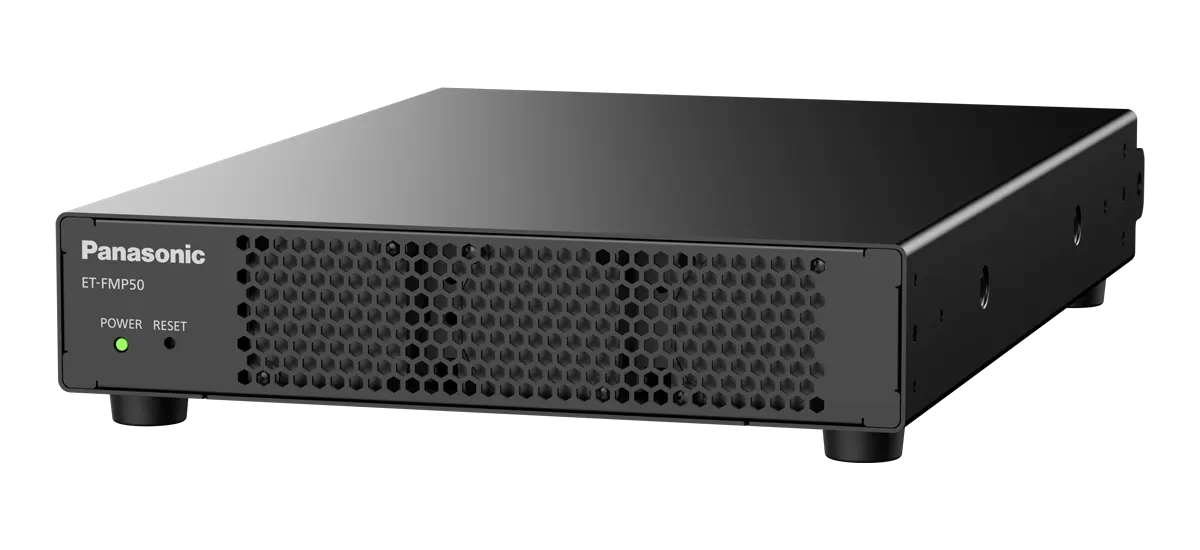
Optional Media Processors to Simplify Multi-Projection
The projector works with the ET-FMP50 and ET-FMP20 box-type media processors to simplify multi-projection complexity. The processors feature camera-based automatic warping/blending capabilities, media playback, and more.
Note: Compatible cameras (sold separately) comprise NIKON D5200/D5300/D5500/D5600/D7500/Z50/Z5 and the IDS GV-5890CP-C-HQ.

Geometric Adjustment with Free Grid Correction via Remote Control
Free Grid is a function in Geometric Adjustment that enables convenient grid-based image adjustment using the projector’s remote controller. Grid resolutions of 2 x 2, 3 x 3, 5 x 5, 9 x 9, or 17 x 17 can be projected and areas of the image reshaped or geometrically altered to compensate for screen distortions. This correction is easily performed by adjusting control points located at grid-line intersections. Move freely between grid resolutions to achieve the desired level of granularity without losing work progress. This clever data-saving function allows technicians to smoothly create a distortion-free projection in a wide range of installation situations.

Smart Projector Control App
Smart Projector Control is a remote app for iOS and Android™ devices*1 that can adjust and control up to 64 projectors individually or simultaneously from anywhere within range of the wireless network. Use the app to connect the projector to the wireless network*2 without manually entering SSID and password simply by scanning a QR Code displayed on the projector’s Information Monitor. Once connected, you can switch the unit on or off, select an input signal, and adjust the projector’s OSD menu settings via your device’s touchscreen with the unit in standby. Installers avoid delays when it’s not possible to project the OSD menu, and can set up a fleet of projectors while other event infrastructure is assembled. As well as OSD menu operations, the app can adjust lens settings and select test patterns and lets you focus the projection using your phone camera*3 from distances of up to 30 m*4 (98 ft) away.
*1 Check device and OS compatibility at the App Store or Google Play.
*2 Requires optional AJ-WM50 Series Wireless Module.
*3 Some devices do not support projector autofocus function.
*4 When projecting a 300-inch image. Maximum distance is 3 m (10 ft) for a 100-inch image.
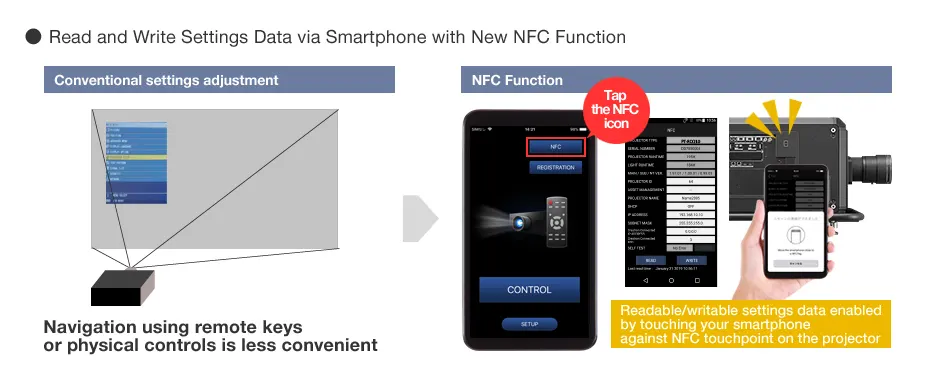
NFC Function
PT-RQ50K projectors can be paired with your smartphone via NFC* (Near Field Communication) when the projector is off and disconnected from AC power by touching the device against the projector’s NFC touchpoint. Adjust selected projector settings using Smart Projector Control app, such as Projector ID and IP address, while waiting for power to be connected and setup to begin. Fleets of projectors can be prepped for immediate network connection and setup the moment power rolls out on the installation site, saving time and resources. After the event, projectors can be reset to factory defaults while unplugged and ready for crating, an action that used to require OSD menu projection.
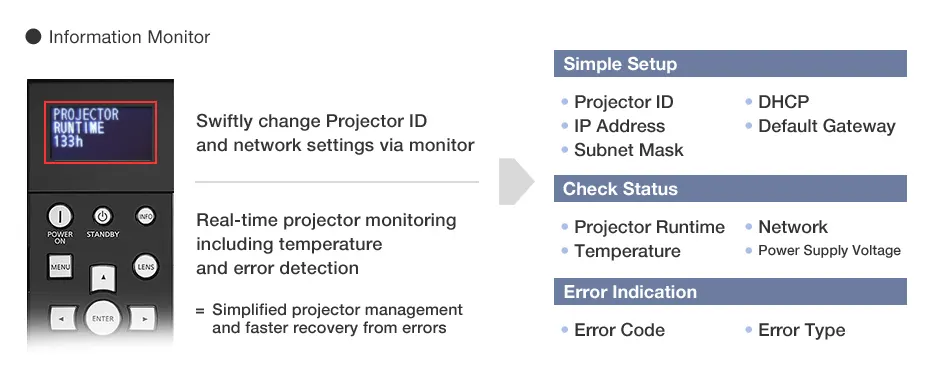
New Information Monitor
To further simplify setup and operation of the PT-RQ50K, an Information Monitor is located on the side panel adjacent to terminals and physical controls. The monitor provides menu-based navigation for smooth setup of Projector ID and basic network configuration. It also shows projector status including temperature, runtime, and active signal data, as well as error codes should a problem be detected.

Dedicated Lenses Cover All Throw-Ratios
An exclusive new lineup of optional lenses for the PT-RQ50K provides throw-ratio coverage from 0.55:1 to 7.76:1, adapting projections to suit the installation site. All seven models support powered zoom, lens-shift, as well as lens memory and lens ID for easier on-site adjustments. AFO (Active Focus Optimizer) feature optimizes focus based on content APL, keeping images sharp and in focus.
Original Cooling System Secures Projection Stability
Reliable Red-Laser Performance for Intense Color
Red lasers demonstrably heighten color expression. However, implementation of the technology has been a challenge due to the laser’s sensitivity to temperature fluctuation. Panasonic innovates a highly stable red-laser drive that digitally controls light output within precise parameters frame-by-frame using Dynamic Digital Control and an independent cooling system. The additional red laser is key to the PT-RQ50K’s vivid red reproduction and a superior RGB balance.

Shielded Laser Drive with Finless Radiator
Hermetically sealed DMD block, shielded laser drive, and filterless cooling system is reinforced by a new finless radiator that improves cooling efficiency by as much as 30 % over previous implementations while protecting critical components from dust intrusion. The projector exceeds common international dustproofing guidelines and is manufactured in Japan to extremely rigorous quality control standards. Business operators can expect up to 20,000 hours* of reliable maintenance-free projection at full brightness.
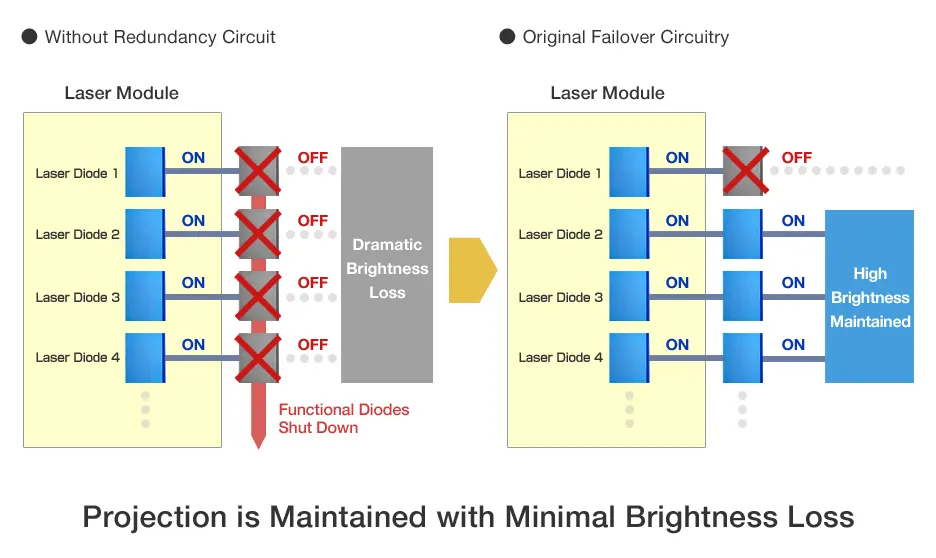
Solid-State Laser Modules with Failover Circuitry
The SOLID SHINE Laser drive groups laser diodes into discrete modules. In the unlikely event one single diode in a module goes out, Failover Circuitry enables the diodes in the affected series to be bypassed—the remaining, functional diodes continue to operate with imperceptible loss in brightness. If a laser diode fails in other laser projectors, the whole module goes down and the brightness loss is so great that the projector must be taken offline. Panasonic laser diode failover technology adds yet another layer of insurance for events projection when image presentation must be maintained.

Backup Input Guarantees Picture Display
If the primary signal is disrupted, the projector switches to a backup input*1 in just 0.3 seconds at the fastest*2, so image display is maintained when projection mustn’t be interrupted. No screen-blanking occurs during backup input-switching.
*1 Combination of primary/secondary input terminals is fixed. Switching to secondary input (or primary input) occurs automatically when the input signal for primary input (or secondary input) is disrupted. The Backup Input Setting is enabled only when the input signal to primary and secondary terminals is the same.
*2 Switching speed is an approximate value and may vary depending on backup input mode settings and source device configuration.
Additional Features
- Quick Start and Quick Off
- Laser Safety Guaranteed
- Multi-screen Support System
- Multi-Unit Brightness and Color Control
- Data-cloning Function
- Art-Net DMX, Crestron Connected™, and PJLink™
- DICOM Simulation Mode
- Waveform Monitor Function
- Power Management Reduces Downtime
Specifications of PT-RQ50K
Tabell med specifikationer
| Projector type | 3-Chip DLPTMprojector |
|---|---|
| Display method | DLPTM chip x 3, DLPTM projection system |
| Display Device -> Panel size | 35.1 mm (1.38 in) diagonal (17:9 aspect ratio) |
| Display Device -> Number of pixels | 8,847,360 (4096 x 2160 pixels) x 3 |
| Light source | Laser diodes (Blue LD, Red LD) |
| Light output *1 | 50,000 lm |
| Light output (ANSI) | 50,000 lm |
| Light output (Center) *1 *2 | 51,000 lm (Center) |
Tillbehör och programvara
Showing 4 of 7
Visual Software Suite
Showing 1 of 1
Relaterade resurser
Showing 12 of 29
Sorry there was an error...
The files you selected could not be downloaded as they do not exist.
You selected items.
Continue to select additional items or download selected items together as a zip file.
You selected 1 item.
Continue to select additional items or download the selected item directly.








Dela sida
Share this link via:
X
LinkedIn
Xing
Facebook
Or copy link: